
 Posted by
 Unlock Tool Download 2026-03-17-0 (Latest version) Complete Guide (2026)
Introduction
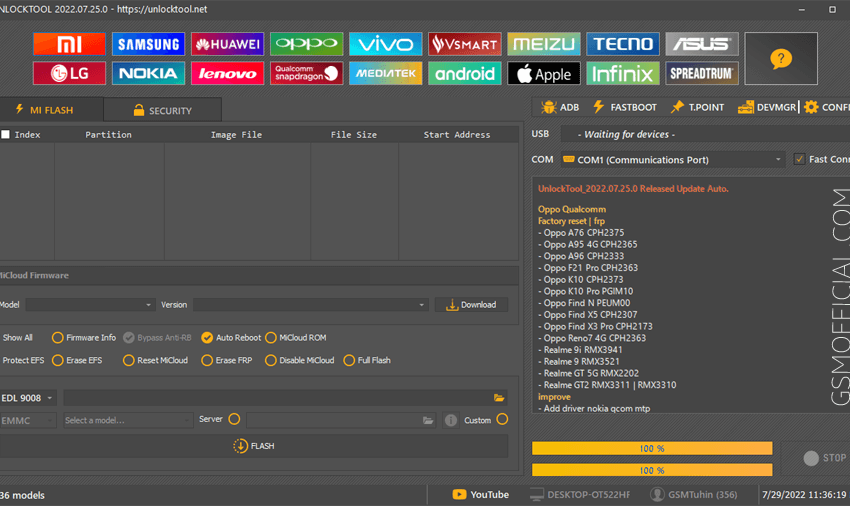
Unlock Tool is an excellent offline PC setup for users looking for a standalone installation that works seamlessly on Windows 10 and Windows 11, and even compatible with older versions. It’s a must-have for Indian users who want to manage their devices effectively. In this complete guide, we’ll address the features and installation methods of the latest version, 2026-03-17-0. You can find more details on the features of this tool by exploring our dedicated Unlock Tool page.
What This Mobile Tool Does?
Unlock Tool is designed to make your life easier when dealing with various smartphone brands like Xiaomi, Samsung, Huawei, Oppo, Vivo, and more. It’s primarily used for writing stock ROMs and unlocking bootloaders on Xiaomi devices without any authentication hassles.
Especially for game enthusiasts, it helps reset devices efficiently, allowing for clean starts and optimal performance. Utilizing this tool can significantly enhance your gaming experience by eliminating lag issues caused by software restrictions.
Tools Key Features
- Device Compatibility: Supports major brands like Xiaomi, Samsung, Huawei, Oppo, and Vivo.
- Stock ROM Writing: Effortlessly flash stock ROMs on your devices.
- Bootloader Unlocking: Unlock bootloaders without authentication.
- FRP Lock Reset: Bypass Factory Reset Protection easily.
- Screen Lock Reset: Quickly reset patterns, PINs, and passwords.
- Offline Functionality: No internet connection required once installed.
- USB Driver Setup: Comes bundled with necessary USB drivers.
- User-friendly Interface: Simplified navigation for all skill levels.
- Custom Flashing: Supports custom flashing for various scenarios.
- EDL Mode Support: Allows emergency downloads mode connection.
- Device Back-Up: Backup important data before making significant changes.
- Regular Updates: Frequent software updates to enhance performance.
- Large User Base: Community support ensuring continuous improvement.
- Tutorials Included: Step-by-step guides for new users.
- Multi-language Support: Available in various languages for convenience.
- Efficiency Boost: Reduces the risk of bricking devices during updates.
- Log Maintenance: Keeps a detailed log of changes made on the device.
System Requirements
| OS | Windows 10 / 11 |
| CPU | Intel or AMD Processor (1.5 GHz or higher) |
| RAM | At least 4 GB |
| Storage | Minimum 500 MB free space required for installation |
How To Download and Install?
To get started with the Unlock Tool, follow these steps:
- Download: Click on the official download link provided at the bottom.
- Extraction: Extract the downloaded zip file using any compression software.
- Install: Run the setup to install the Unlock Tool. Follow the on-screen instructions.
- USB Driver Installation: Ensure to install the relevant USB drivers.
- First Launch: Open the tool after the installation is complete.
Common Errors and Fixes
| Error | Fix |
|---|---|
| Device Not Detected | Check USB drivers and make sure the device is in the correct mode. |
| Application Crash | Ensure your PC meets the system requirements. |
| Insufficient Permissions | Run the tool as an administrator. |
| Invalid File Format | Ensure you are using compatible ROM files. |
Performance And Usage of Unlock Tool Download 2026-03-17-0 (Latest version)
The Unlock Tool provides exceptional performance, allowing you to easily manage and modify multiple devices. Users have reported that its efficiency significantly reduces the time spent on flashing ROMs or unlocking bootloaders, ensuring that your devices maintain optimal performance.
Moreover, its user-friendly interface ensures that both novice and expert users can navigate the tool without any hurdles, making it ideal for everyone from tech enthusiasts to professionals.
Unlock Tool Download 2026-03-17-0 (Latest version) Pros And Cons
- Pros:
- Compatibility with multiple brands.
- User-friendly interface.
- Regular updates and community support.
- Includes essential USB drivers.
- Highly efficient for various tasks.
- Backup features to safeguard data.
- Cons:
- May require activation for some features.
- Initially complex for absolute beginners.
- Device dependency – not all features work on every model.
- Frequent software updates might require attention.
- Some users may experience connectivity issues.
Related Tools
If you’re interested in exploring more tools similar to Unlock Tool, consider checking out these options that also enhance your mobile experience: HalabTech Tool, UMT Huawei Suit, and UMT GSM Tool. Each of these tools offers unique functionalities that complement the features of Unlock Tool.
Remember that using these tools can enhance your smartphone management capabilities. They can help you resolve other issues such as resets, ROM flashes, and device unlocking.
FAQ
1. Can I use Unlock Tool for all smartphone brands?
Yes, it supports major brands like Xiaomi, Samsung, Huawei, Oppo, and Vivo.
2. Is the Unlock Tool safe to use?
Yes, it has been scanned for viruses and is deemed safe. Always download from official sources.
3. Do I need an internet connection to use Unlock Tool?
No, once installed, it can operate offline.
4. How often is the Unlock Tool updated?
The tool is regularly updated to fix issues and introduce new features.
5. What should I do if my device isn’t detected?
Ensure that the correct USB drivers are installed and your device is in the required connection mode.
6. Can I recover deleted data using the tool?
This tool does not provide data recovery features.
7. Is there a customer support option available?
Yes, community support is available along with user forums for assistance.
8. Will using this tool void my device warranty?
Using Unlock Tool might void your warranty, depending on your manufacturer’s policy.
9. Can I use it on Mac?
This tool is primarily for Windows users. Compatibility with Mac is limited.
10. Is there a free trial available?
Yes, a free trial of the Unlock Tool is typically available for new users.
11. How do I activate the full features of the tool?
Contact the official reseller for activation details after installation.
Conclusion
In 2026, the Unlock Tool continues to serve as a powerful asset for mobile users, enabling them to manage their devices seamlessly. Its blend of user-friendly features and robust performance makes it a vital tool for anyone interested in mobile technology. Make sure to stay updated with the latest version and utilize all its features for optimal device functionality.
📥 Download Links for Unlock Tool
Here are the download links for the Unlock Tool with the latest updates and versions. Choose the link that best suits your needs! 🚀
| Version | Download Link 1 | Download Link 2 |
|---|---|---|
| Latest Version (2026-03-17-0) | Download (MediaFire) | Download (G-Drive) |
| Old Version (2026-02-25-0) | Direct Link | G-Drive |
| Old Version (2025-09-04-0) | Direct Link | G-Drive |
| Old Version (2025-08-15-0) | Mega | G-Drive |
| Old Version (2025-06-28-0) | Mega | G-Drive |
| Old Version (2025-06-17-0) | Mega | G-Drive |
| UnlockTool Ramdisk File | MediaFire | – |
| UnlockTool Driver | AFH | G-Drive |
🔗 Note: Always ensure that you are downloading the latest version to avoid compatibility issues. Take necessary backups before using the tool for flashing or unlocking.